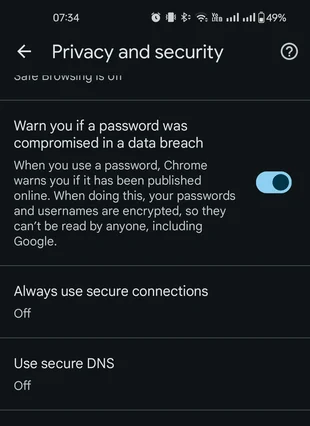
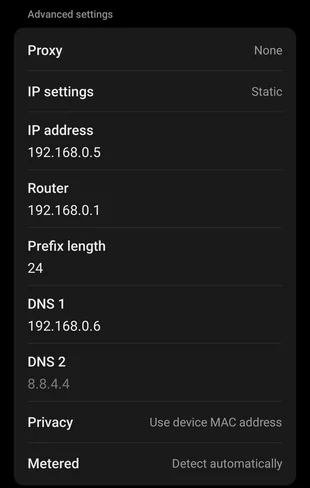
The motivation here is - You set up a custom DNS provider. In my case it's Pi Hole. You set up everything around - network, the client computer etc. etc. etc. Now everything works, IP's are being filtered or whatever and you can access your Pi Hole admin.<note Should you struggle accessing your admin on url pi.hole/, note that you have to go with http://pi.hole>At this point you give your phone a shot - please note that I'll be only covering Android and Chrome here. Setting up an Android phone to respect custom DNS is for another guide, but it's fun on it's own. You try to locate something that gets blocked and it doesn't work. Or you try to access Pi Hole admin and it doesn't work. Or some other test requiring usage of DNS configuration and it...you guessed it...doesn't work.There are two things you need to do here. Both of them!1) You need to go to your Chrome setting and turn "Use secure DNS" Off. When on, Chrome bypasses your phone DNS configuration and uses their own, predefined and secured. Note that you are losing the "secured" part by doin this.2) You need to go to your WiFi settings, which should be static at this point and you need to set up one DNS server to your Pi Hole and remove the other one. The reason for this is that DNS 1 and DNS 2 are not priorities, they are equals and having the other one there allows Pi Hole to be bypassed. Please note that by doing this you connect your phone to a single point of failure. It's just your home (one) network, but still in case of network issues, this might complicate things.At this point you should be all set! "Use secure DNS" Off1 DNS only